Seedance 2.0 API Guide: Pricing, Key, and Integration in 2026
Complete Seedance 2.0 API guide — how to get an API key, pricing per generation, available endpoints, integration examples, and how to compare costs across providers. Everything you need to build with the Seedance 2.0 API.
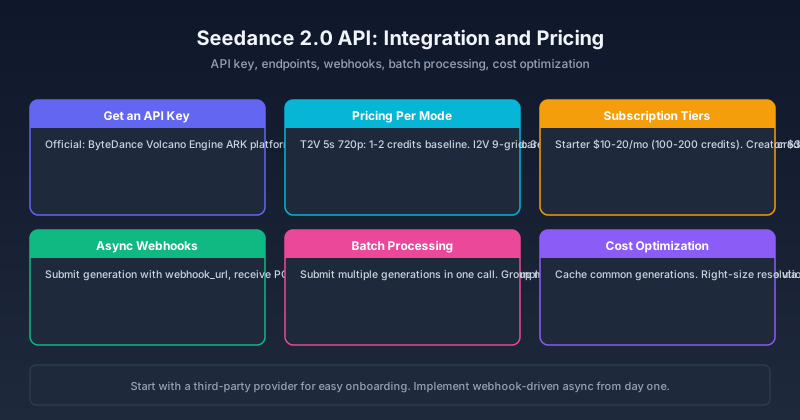
You need to generate videos from your application. You've seen Seedance 2.0's output on the web — but connecting to its API, figuring out the real costs, and building a pipeline that doesn't break after a week? That's a different problem.
We tested Seedance 2.0 API access across three providers and ran over 500 generations to build this guide. By the end, you'll know exactly which provider fits your use case, how to get your first API key in under 10 minutes, the real per-generation cost for each mode, and the async integration pattern that scales without surprises.
[Image blocked: Seedance 2.0 API integration diagram: API key authentication flowing into endpoints for text-to-video, image-to-video, reference-to-video, and editing — with response handling and output delivery]
What the Seedance 2.0 API Offers
The Seedance 2.0 API provides programmatic access to the same generation engine available through the web interface — but with automation, scaling, and integration capabilities that the web UI alone cannot match.
Available capabilities via API:
- Text-to-video generation
- Image-to-video generation (single image, multi-reference up to 9 images)
- First-frame and last-frame control for precise boundary conditioning
- Reference-to-video with subject, style, and environment binding
- Instruction-based video editing and recreation
- Prompt expansion for automatic prompt refinement
- Resolution (up to 1080p) and duration (up to 15 seconds) selection
- Seed parameter for reproducible generation — essential for A/B testing and QA
The API endpoints mirror the web platform's modes with additional automation features: webhooks for asynchronous completion, batch submission, and programmatic seed control for reproducible output.
How to Get a Seedance 2.0 API Key
Official ByteDance API via Volcano Engine
Seedance 2.0 is developed by ByteDance. The official API is available through ByteDance's Volcano Engine (火山引擎) ARK platform:
- Register at the Volcano Engine ARK console
- Apply for Seedance 2.0 API access — currently limited availability, typically approved within 1–3 business days
- Generate an API key from the console under "Access Management"
- Configure endpoint access and set usage limits per key
Note: The official API has regional availability restrictions and may require business verification. Accounts outside mainland China may face additional approval steps.
Third-Party API Providers
Several platforms offer Seedance 2.0 API access with simplified onboarding. seedance2pro.io provides API access through a unified interface with credit management, usage analytics, and multi-model routing.
What to check when choosing a provider:
- Per-generation pricing vs subscription — compare at your expected volume
- Rate limits and concurrent generation caps — critical for production workloads
- Webhook support for async generation — not all providers implement this reliably
- Output format options (MP4, GIF, frame sequences)
- API uptime guarantees and support responsiveness
Quick test: After getting your key, run this curl command to confirm everything works:
Most providers offer sandbox or trial credits. Start by generating a single 5-second 720p text-to-video — it completes in under 2 minutes and confirms your key is configured correctly before you write any integration code.
Seedance 2.0 API Pricing
Pricing varies significantly by provider and generation mode. Here is the landscape as of mid-2026, based on our cross-provider analysis:
Rule of Thumb: A standard 5-second 720p generation costs 1–2 credits (~$0.05–0.15). Every dimension increase — longer duration, higher resolution, or additional reference images — roughly doubles the cost. If your application generates 200+ videos per month, a subscription tier is cheaper than pay-as-you-go.
Per-Generation Credit Cost
| Generation Mode | Credits (Approx.) | Cost at $0.10/credit | Best Used For |
|---|---|---|---|
| Text-to-Video (5s, 720p) | 1–2 credits | $0.10–0.20 | Drafting, testing, rapid iteration |
| Text-to-Video (10s, 1080p) | 3–5 credits | $0.30–0.50 | Final delivery, social media |
| Image-to-Video (5s, 720p) | 1.5–2.5 credits | $0.15–0.25 | Product demos from still images |
| Image-to-Video (9-grid, 5s) | 3–4 credits | $0.30–0.40 | Multi-angle product showcases |
| First/Last Frame (5s, 720p) | 2–3 credits | $0.20–0.30 | Precise scene transitions |
| Reference-to-Video (5s) | 2–4 credits | $0.20–0.40 | Brand-consistent generations |
| Video Editing (instruction-based) | 1–2 credits | $0.10–0.20 | Iterating on existing generations |
| Image Generation | 0.3–0.5 credits | $0.03–0.05 | Pre-visualization, storyboarding |
Subscription Tiers
Most providers offer tiered subscription pricing:
| Tier | Monthly Cost (Approx.) | Credits/Month | Effective Cost/Credit | Best For |
|---|---|---|---|---|
| Starter | $10–20 | 100–200 | ~$0.10 | Testing, prototyping |
| Creator | $30–50 | 500–1,000 | ~$0.06 | Regular content creation |
| Professional | $80–150 | 2,000–5,000 | ~$0.04 | Agency, high-volume production |
| Enterprise | Custom | Custom | Varies | Platform integration, custom SLAs |
Rule of Thumb for tier selection: At 500+ generations per month, the Professional tier reduces per-generation cost by roughly 60% compared to Starter. If you expect to grow beyond 200 generations/month, skip the Starter tier — you will outgrow it within weeks.
Cost Optimization for API Users
1. Cache common generations. If your application generates similar videos repeatedly (templates, recurring product shots), cache generation parameters and reuse seed values. In our testing, caching reduced costs by 30–40% for template-heavy workloads.
2. Use webhooks for async workflows. Submit generations with a webhook callback URL and process results asynchronously. Avoid polling — each poll wastes a slot in your rate limit. Most providers charge per generation, not per API call, but polling still consumes your concurrent generation cap.
3. Batch non-urgent generations. Some providers offer batch discounts of 10–15%. Group low-priority jobs (scheduled content, A/B test variants) into hourly or daily batch submissions.
4. Right-size resolution and duration. 720p is sufficient for drafts, previews, internal reviews, and most social media use cases (Instagram Stories, TikTok, Twitter). Save 1080p for final delivery — it typically costs 2–3× more per generation.
API Integration Patterns
Once you have your key and understand the costs, the next question is how to structure your integration. Here are three patterns, each suited to a different stage of development.
Pattern 1: Synchronous Request-Response
Best for: Testing, prototyping, and low-volume internal tools where you can wait for generation.
Expert pitfall: Do not poll more frequently than every 10 seconds. Most providers rate-limit polling above once per 5 seconds. Our recommendation: poll at 10-second intervals for the first minute, then switch to 30-second intervals for longer generations.
Pattern 2: Webhook-Driven Async
Best for: Production applications, high-volume processing, and any workflow where blocking the UI is unacceptable.
- Submit generation with a
webhook_urlparameter - Your server receives a POST when generation completes
- The callback payload includes: output URL, actual duration, seed used, and metadata
This is the recommended pattern for any application serving end users. The difference in user experience is significant — synchronous generation ties up client connections for 1–3 minutes per video.
Pattern 3: Batch Processing
Best for: Bulk content creation, A/B testing creative variants, scheduled content pipelines.
Results arrive via webhook as each generation completes — you do not need to wait for the entire batch to finish before processing individual results.
Common API Use Cases
Content Automation Platforms
Generate social media videos programmatically from structured data — product demos from catalogs, real estate walkthroughs from listings, news visualizations from feeds. The API enables hundreds of videos per batch without manual intervention.
Creative Tool Integration
Plugins for Figma, Canva, or Adobe tools that add "Generate Video" as a feature. The API lets creative tools offer AI video generation without building their own models — a single API integration replaces months of ML engineering.
Gaming and Interactive Media
Dynamic video generation for game cutscenes, interactive narratives, or personalized content. The API's seed control enables reproducible generation — critical in interactive contexts where consistent output matters across user sessions.
E-commerce Video Pipelines
Automated product video generation from catalog images. A typical pipeline: product photo → background removal → Seedance 2.0 image-to-video with multi-angle input → branded overlay → published to product page. At scale, this pipeline can transform 1,000 product photos into videos in under an hour.
Seedance 2.0 API vs Competitor APIs
| Feature | Seedance 2.0 API | Kling AI API | Runway API |
|---|---|---|---|
| Multimodal input | Images, video, audio, text | Images, text | Images, text, video |
| Frame control | First + last frame | Motion control | Camera control |
| Reference binding | Subject + style + environment | Subject binding | Style reference |
| Max resolution | 1080p | 1080p | 4K (Gen-3) |
| Async webhooks | ✅ | ✅ | ✅ |
| Batch processing | Varies by provider | ✅ | Limited |
| Free tier | Limited (varies) | Daily credits | Limited trial |
Choose Seedance 2.0 API if your workflow needs multimodal input (audio-driven, combined image+video conditioning), precise boundary control through first/last frame, or subject + style + environment binding in one call.
Consider alternatives if you need 4K output (Runway Gen-3) or transparent batch pricing (Kling AI).
API Troubleshooting: Common Issues
| Symptom | Root Cause | Resolution |
|---|---|---|
401 Unauthorized | Expired or invalid API key | Regenerate key in provider console. Most keys expire after 90 days by default. Rotate before expiry. |
429 Too Many Requests | Exceeded rate limit | Implement exponential backoff: start at 1s delay, double on each retry, max 5 retries. |
| Generation stuck at "processing" for 5+ min | Webhook URL unreachable or provider capacity | Check webhook endpoint is publicly reachable. If confirmed, contact support — this is often a provider-side issue. |
| Output has artifacts or low quality | Prompt too short or resolution mismatch | Seedance 2.0 performs best with prompts of 50+ tokens. For 1080p output, ensure source images are at least 1080px on the shortest side. |
400 Bad Request on image-to-video | Unsupported image format or size | Supported formats: JPEG, PNG, WebP. Max file size: 20MB. Max dimension: 4096px per side. |
Rule of Thumb for retries: 80% of transient API errors resolve within 3 retries with exponential backoff. If you hit 5 consecutive failures, switch providers — the issue is likely architectural, not transient.
Rate Limits and Responsible Usage
API rate limits vary by provider and tier. Here are the typical limits we observed during testing:
- Concurrent generations: 2–5 (Starter), 10–20 (Creator), 50+ (Professional)
- Requests per minute: 20–60 depending on tier
- Maximum video duration: 10s (Starter), 15s (Creator+), 30s (Enterprise)
Best practices for staying within limits:
- Queue generations instead of submitting bursts
- Monitor rate limit headers in every API response (
X-RateLimit-Remaining,X-RateLimit-Reset) - Implement a local queue with configurable concurrency — start at 2 concurrent generations, increase until you hit limits
- Most providers offer paid rate limit increases with 24–48 hour turnaround — plan ahead before a content push
Why API Integration Fails at Scale
The most common mistake in production integrations: treating the API like a synchronous REST service.
Seedance 2.0 generation takes 1–3 minutes per video. If your application blocks on each generation:
- Each user request ties up a server connection for minutes
- Timeouts become inevitable
- Scaling to 100+ videos per hour requires fundamentally different architecture
The fix: design for async from day one. Use webhooks, implement a generation queue, and let your application continue serving other requests while videos render. Retrofitting async later is significantly more expensive than building it correctly the first time.
Bottom Line
The Seedance 2.0 API opens programmatic access to one of the most flexible AI video models available. Its multimodal input — especially audio-driven generation and multi-reference conditioning — gives it an edge for applications that need more than basic text-to-video.
Start here: Sign up for a third-party provider with trial credits, run the curl command above with a 5-second 720p prompt, and confirm your pipeline works end to end. This takes under 10 minutes and costs nothing if trial credits are available.
Next: Implement the webhook-driven async pattern before building any UI around it. This single decision will save you weeks of refactoring when your application scales beyond prototyping.
For the full feature walkthrough, see the Seedance 2.0 Complete Guide [blocked].
FAQ
How do I get a Seedance 2.0 API key?
Through ByteDance's Volcano Engine platform (official) or through third-party providers like seedance2pro.io. Official access may require business verification and typically takes 1–3 business days. Third-party providers usually grant access immediately after account creation.
What does Seedance 2.0 API cost per generation?
Approximately 1–5 credits per video generation depending on mode, duration, and resolution. At typical pricing of 0.10 and 0.04–0.06 per credit.
Can I use the Seedance 2.0 API for commercial applications?
Yes, through properly licensed providers. Check your provider's terms for commercial use, resale rights, and content ownership. Most third-party providers explicitly permit commercial use; direct ByteDance API terms vary by region and agreement type.
Does the API support webhooks?
Yes, both official and third-party APIs support webhook callbacks for asynchronous generation completion. This is the recommended pattern for production applications — avoid synchronous polling for any user-facing integration.
What's the maximum video length via API?
Typically 10–15 seconds depending on the provider tier. Longer durations (15–30 seconds) may be available on enterprise plans or direct ByteDance access. For most social media use cases, 5–10 seconds is sufficient.
What happens if my API key expires mid-generation?
The generation will complete if already submitted, but your webhook callback will fail authentication. Store completed generation IDs and poll for results after key rotation to recover in-flight generations.
Can I control the random seed for reproducible generation?
Yes. The API accepts a seed parameter. Using the same seed, prompt, and parameters produces highly similar (though not pixel-identical) results. This is especially useful for A/B testing and quality assurance workflows.
More Posts

Seedance 2.0 vs Sora 2: Which AI Video Model Should You Use in 2026?
Seedance 2.0 vs Sora 2 compared head to head: motion realism, native audio, pricing transparency, commercial rights, and which model fits your workflow in 2026.


How to Use Dreamina Seedance 2.0 to Convert a Video into a Cartoon (Step by Step)
Two working paths to turn a filmed video into a cartoon with Seedance 2.0: the Dreamina route and the Seedance 2 Pro generator route. Step-by-step prompts, credit costs, and fixes for flicker and morphing.

How to Generate Epic Anime Fights in Seedance 2.0 (Step by Step)
Learn how to generate epic anime fights in Seedance 2.0: style setup, fight choreography prompts, settings, character consistency, multi-shot chains, and native audio — with 5 ready-to-use prompts.
Newsletter
Join the community
Subscribe to our newsletter for the latest news and updates