Seedance 2.0 Visual Restrictions Guide: Face Filters, IP Blocks, and What Actually Triggers Them (2026)
Why Seedance 2.0 blocks faces and copyrighted content — how the face detection filter works, what triggers IP blocks, which platforms are stricter, and how to work within the restrictions without violating terms of service.

You upload a reference image to Seedance 2.0, write your prompt, and get a "visual restriction detected" error. The same prompt worked yesterday. A similar image works on a different platform. There is no explanation of what triggered the block or what to change.
Seedance 2.0 applies content restrictions through two separate systems — face detection filters and IP/copyright filters — and each platform that hosts the model configures them differently. A restriction on Dreamina does not mean the same image would be rejected on another platform. A restriction today does not mean the same prompt would be rejected tomorrow.
This guide covers how Seedance 2.0's visual restrictions work, what triggers them, why they vary by platform, and what you can change to get your content accepted.
How Visual Restrictions Work
Seedance 2.0 runs automated moderation on two separate inputs before generation begins:
- Reference images — face detection runs on uploaded images before the prompt is evaluated. If a face is detected in a reference image, the generation may be rejected at that point.
- Text prompts — the prompt is scanned for named individuals, copyrighted characters, brand names, and sensitive context. If flagged, the generation is blocked.
The moderation runs before the model starts generating. If the image or prompt triggers a filter, credits are not consumed for the blocked generation.
Two Types of Restrictions
Face-Based Restrictions
Seedance 2.0 uses face detection and recognition filtering to identify prompts or reference images involving specific individuals.
What triggers it:
- Named celebrities, politicians, or public figures in the prompt
- Reference photos of identifiable real people
- Highly realistic faces in sensitive contexts
- Prompts suggesting impersonation or deception
What passes:
- Generic unnamed humans described from scratch
- Original characters without reference to real people
- Stylized or illustrated faces (cel-shaded, oil painting, cartoon)
- Animals, landscapes, architecture, abstract content
IP and Copyright Filters
Seedance 2.0 also filters content that references copyrighted characters, brands, or trademarked assets.
What triggers it:
- Named franchise characters (Disney, Marvel, Nintendo)
- Brand logos and trademarked product designs
- Named artist styles
- Copyrighted visual assets
What passes:
- Original characters designed from scratch
- Descriptive prompts that avoid brand names
- Public domain references
- Generic product demos without visible branding
Why Restrictions Vary by Platform
The same prompt and image can be accepted on one platform and rejected on another. This is not a bug — each platform configures Seedance 2.0's moderation filters independently.
ByteDance-owned platforms (Dreamina) tend to apply stricter filters because they face direct legal liability. Third-party platforms (Higgsfield, seedance2pro.io) may configure more permissive filters, especially for face content.
If your content is being blocked on one platform, it may work on another platform that hosts the same Seedance 2.0 model with different moderation settings.
What to Do When You Hit a Restriction
For Face Blocks
Avoid named references. Describe appearance instead of naming a specific person. Hair color, build, clothing, and setting are more reliable than a celebrity name.
Use stylized aesthetics. Cel-shaded, illustrated, or oil painting styles often bypass face detection that blocks photorealistic faces.
Pre-generate characters. Create a character image using an image model, then feed that into Seedance 2.0 as a reference image rather than describing the person in the prompt.
Switch platforms. If you consistently get face blocks on one platform, try a platform that configures Seedance 2.0 with more permissive face filters.
For IP Blocks
Describe by traits. Instead of naming a franchise character, describe their visual traits — "a small yellow cartoon character with round ears" rather than "Pikachu."
Design original characters. Creating your own characters is the most reliable way to avoid IP filters.
Use public domain references. Start from public domain artwork, CC-licensed images, or assets you own.
What Happens When a Restriction Triggers
When a visual restriction is triggered:
- The generation is blocked before it starts.
- Credits are not consumed for the blocked request.
- The error message does not specify which filter triggered the block.
- The same prompt may work at a different time or on a different platform.
Because the error message gives no specifics, you need to test changes methodically — change one thing at a time (remove the reference image, simplify the prompt, change the wording) until the restriction clears.
Frequently Asked Questions
Why did my prompt work yesterday but not today? Seedance 2.0's moderation settings can change without notice. Stricter filtering may be applied during high-profile events or after policy updates. If a previously working prompt stops working, wait a day and try again, or switch to a platform with different filter settings.
Does this happen on every platform that offers Seedance 2.0? The filters exist on every platform, but each platform sets its own moderation strictness. ByteDance-owned platforms tend to be stricter. Third-party platforms may offer more permissive settings.
Can I use faces at all in Seedance 2.0? Yes, but with limitations. Generic, unnamed faces in non-sensitive contexts usually pass. Named individuals, public figures, and faces in sensitive contexts are more likely to be blocked. Stylized or illustrated faces have a higher pass rate than photorealistic ones.
Does the restriction apply to both text prompts and reference images? Yes. Both inputs are scanned independently. A safe prompt with a flagged reference image will be blocked, and a flagged prompt with a safe reference image will also be blocked.
Summary
Seedance 2.0's visual restrictions come from two separate systems: face detection filters and IP/copyright filters. Both run before generation, and neither consumes credits when triggered.
Restrictions vary by platform — ByteDance-owned platforms are stricter, third-party platforms can be more permissive. If your content is blocked on one platform, try another.
To minimize restrictions: avoid named references, use stylized aesthetics, describe by traits rather than names, and test methodically by changing one variable at a time.
Meer Berichten

How to Access Seedance 2.0: Platforms, Regions, and Browser Access
Learn how to access Seedance 2.0 — which platforms work in your browser, region restrictions explained, and what to do if the model is blocked in your country.

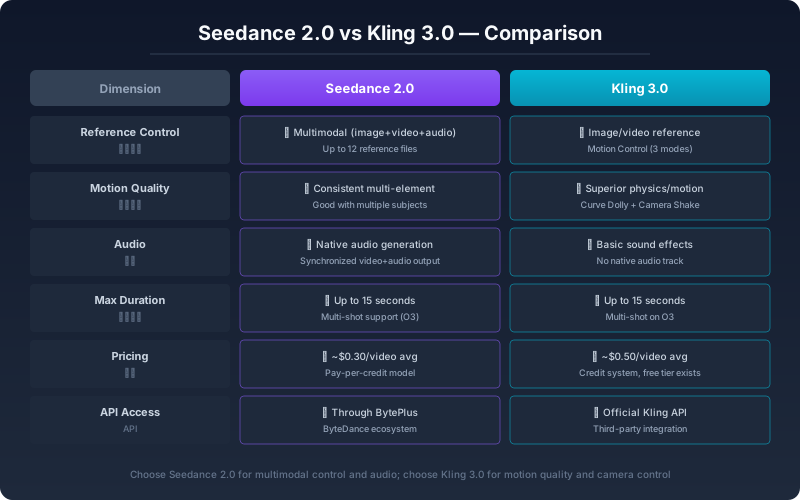
Seedance 2.0 vs Kling 3.0: Which AI Video Model Should You Use in 2026?
An honest, feature-level comparison of Seedance 2.0 and Kling 3.0 for AI video creation. See how they differ in reference control, motion quality, audio sync, pricing, and real-world workflow fit.


How to Keep the Same Character Consistent Across Multiple Seedance 2 Videos (2026 Step-by-Step Guide)
Master Seedance 2 same character consistency in 2026. Anchor image strategy, first-frame locking, prompt templates, and a rerender checklist for keeping one person identical across multiple AI video generations.
Nieuwsbrief
Word lid van de community
Abonneer je op onze nieuwsbrief voor het laatste nieuws en updates