Is Seedance 2.0 Open Source? What You Can Actually Run Locally in 2026
Seedance 2.0 open source status explained — what GitHub projects are real, whether ComfyUI nodes run locally or call the API, and the best open-source alternatives if you need offline video generation.
You saw the GitHub repos. You saw the ComfyUI nodes. You saw the open-source desktop app. And now you are wondering: can I just download Seedance 2.0, run it on my own machine, and stop paying per generation?
That question comes up thousands of times a month. "seedance 2.0 open source" alone gets over 5,000 searches. "seedance 2.0 local" and "seedance 2.0 github" add several thousand more. And the mixed signals from search results make it worse — one page shows a desktop app with a GitHub link, the next says the model is proprietary, and a Reddit thread says neither is quite right.
Here is the short answer: Seedance 2.0 — the model itself — is not open source. It is a proprietary model developed by ByteDance and runs primarily through cloud APIs. But there are legitimate open-source tools around it that can make it look like the whole thing is open source, and knowing the difference saves you a lot of wasted setup time.
This guide covers exactly what is open, what is closed, what runs locally, and — if your goal is truly local video generation — what your best options are instead.
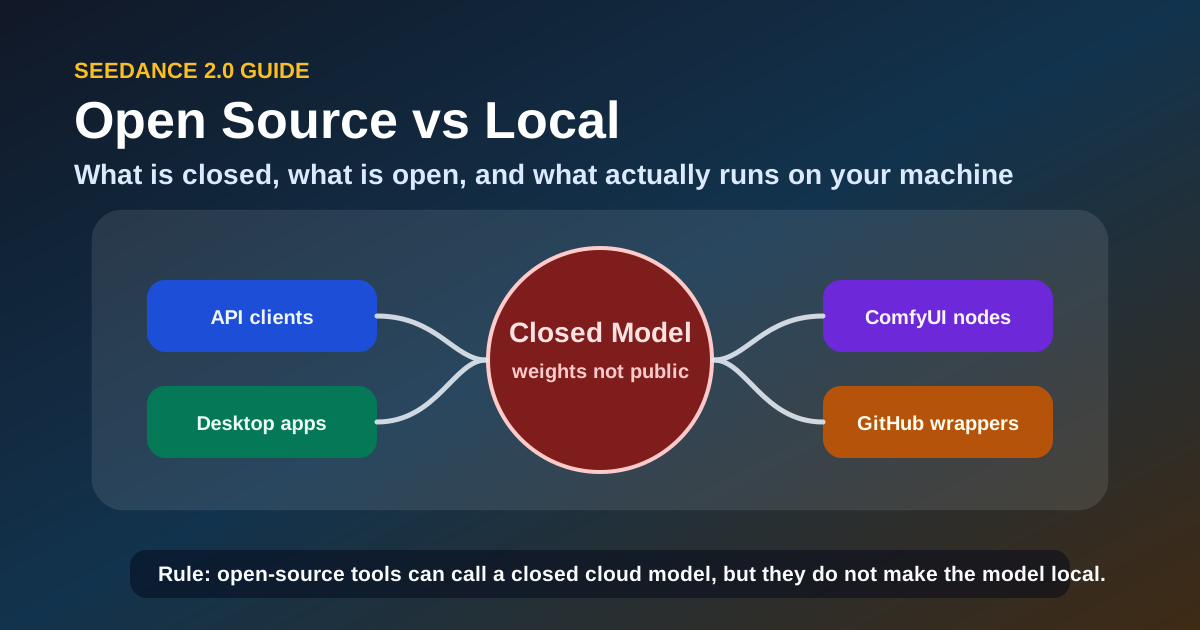
[Image blocked: Seedance 2.0 open source distinction diagram: the proprietary model core (closed) surrounded by open-source tools — API clients, ComfyUI nodes, desktop wrappers — each shown as a distinct layer]
The Short Answer
| Question | Answer |
|---|---|
| Is the Seedance 2.0 model open source? | No. ByteDance has not released model weights. |
| Is there an official Seedance 2.0 GitHub? | No. There is no official ByteDance GitHub repository for the model. |
| Can I download model weights? | No. Weights are not publicly available. |
| Can I run it in ComfyUI locally? | Partially. ComfyUI nodes exist but they call the cloud API — they do not run the model on your hardware. |
| Is the desktop app truly local? | No. Open-source desktop apps are API wrappers. The model runs on ByteDance servers. |
| Is there a Hugging Face / Ollama version? | No. Seedance 2.0 is not available on Hugging Face or Ollama. |
| Can I use it without internet? | No. All generation requires a live API connection. |
| What are my local alternatives? | Open-source video models like Mochi 1, CogVideoX, or LTX Video — see alternatives section below. |
If your goal is local, offline, no-API video generation, Seedance 2.0 is simply not built for that. But if your goal is high-quality controllable video with minimal infrastructure work, the API-based workflow is intentionally designed to be the better experience — and the numbers confirm it: Seedance 2.0 API queries alone account for over 31,000 monthly searches.
Why This Confusion Exists
The misunderstanding is predictable and it comes from three things happening at the same time.
1. Open-Source Tooling Around a Closed Model
Seedance 2.0 has attracted a surrounding ecosystem of open-source projects. Community developers have built:
- ComfyUI custom nodes that let you trigger generations from within your ComfyUI workspace
- Python SDKs and API clients published on GitHub under open-source licenses
- Desktop applications (including one popular Electron-based app) that wrap the Seedance 2.0 API into a standalone interface
- TypeScript SDKs for Node.js and browser integration
All of these are genuinely open source. Their code is on GitHub under permissive licenses. And when you see "Seedance 2.0 open source desktop app" or "Seedance 2.0 ComfyUI node," it is technically true — the tool is open source. The model it calls is not.
The effect is the same as an open-source Gmail client: the interface is open, the service is not.
2. "Run Locally" Can Mean Different Things
When a developer says "I ran Seedance 2.0 locally," they usually mean one of three things:
| What They Say | What Actually Happens | Is the Model Local? |
|---|---|---|
| "I installed a ComfyUI node for Seedance 2.0" | The node sends your prompt to the API and displays the result | No |
| "I used the open-source desktop app" | The app calls the Seedance 2.0 API from your desktop | No |
| "I integrated the SDK into my local app" | Your app calls the API through the SDK wrapper | No |
In all three cases, the generation happens on ByteDance's infrastructure. The local element is the client software, not the model.
3. ByteDance Does Not Clearly Label It
ByteDance's official documentation for Seedance 2.0 focuses on API access and cloud usage. There is no prominent "this model is proprietary" label on the pages most users land on. Combined with the open-source tooling ecosystem, the absence of an explicit statement leaves room for the wrong conclusion.
With those three dynamics in play, the practical question becomes: what exactly exists on GitHub, and how do you tell a locally-runnable model from a client wrapper before spending time on setup?
The most common mistake here is assuming that if a project has a GitHub repo, a desktop app, and a star count in the thousands, the model must run locally. That assumption is wrong in every case for Seedance 2.0 — and verifying it before you start saves hours of wasted effort.
Seedance 2.0 GitHub Projects: What Is Actually Available
Several GitHub repositories reference Seedance 2.0. Here is what they actually do.
Official ByteDance Repositories
ByteDance has not published a Seedance 2.0 model repository. There is no official GitHub org releasing model weights, inference code, or training scripts. The closest official resources are:
- Volcano Engine ARK documentation — API references and integration guides hosted on ByteDance's cloud platform
- Seedance 2.0 SDK samples — Code snippets in the ARK documentation showing API usage in Python and curl
That is the extent of official code publication. Everything else on GitHub is community-built.
Community Repositories
| Type | Example Projects | What They Do | Open Source? | Requires API Key? |
|---|---|---|---|---|
| ComfyUI nodes | ComfyUI-Seedance2 (community) | Add a Seedance 2.0 node to your ComfyUI graph; sends prompts to the API | Yes | Yes |
| Python SDK | seedance2-python (community) | API client with generation, status polling, and result handling | Yes | Yes |
| Desktop app | seedance2-desktop (community) | Electron-based GUI wrapper around the API | Yes | Yes |
| TypeScript SDK | seedance2-ts (community) | Node.js API client for web app integration | Yes | Yes |
| API wrapper | Various curl/bash wrappers | Simplify API calls for scripting and automation | Mostly | Yes |
Every single one of these requires a valid Seedance 2.0 API key. None of them run the model locally. None of them include model weights.
If you came here hoping to find downloadable model weights, that pattern across every repository tells you something important: what you are looking for does not yet exist.
The 30-Second Verification Check
Before spending time on any Seedance 2.0 GitHub project, run this three-step check. It takes under a minute and prevents the most common mistake developers make: assuming open-source code means an open model.
- Look for an API key or token field in the config. If the project asks for an API key, it is not running inference locally — it is calling a remote service. This is the single strongest signal.
- Check the requirements / dependencies. If the project installs a lightweight HTTP client and nothing GPU-related (CUDA, PyTorch with CUDA, ONNX Runtime), it is an API wrapper, not a model runner.
- Search the README for "API", "endpoint", or "cloud". Legitimate open-source model repos talk about model architecture, weight downloads, and hardware requirements. API wrappers talk about endpoints, authentication, and rate limits.
Rule of thumb: If the setup instructions ask for an API key before you can run anything, the model never touches your hardware. This is not a local inference repo.
Can You Run Seedance 2.0 Locally?
The direct answer is no — not the model itself. But the question deserves unpacking because "running locally" means different things at different stages of a production workflow.
What Local Means for Different Workflow Stages
| Stage of Workflow | Can It Run Locally? | What Actually Happens |
|---|---|---|
| Prompt crafting and iteration | Yes | You write and refine prompts in your local editor or ComfyUI — but submission goes to API |
| Pre-processing reference images/videos | Yes | Cropping, resizing, frame extraction — all handled on your machine before upload |
| Model inference (the generation) | No | Generation happens on ByteDance servers |
| Post-processing the output | Yes | Trimming, compositing, color grading — done locally after download |
| Batch automation | Partially | You can script batch submissions locally, but each generation still hits the API |
The pipeline stage that matters — the actual video generation — is the one stage that cannot move to your machine.
None of the tooling around Seedance 2.0 changes this. An open-source desktop app does not make the model open. A ComfyUI node does not make the model local. Understanding this distinction is what separates a productive setup from hours of debugging a configuration that was never designed to work the way you expected.
What About the "Offline Mode" Rumors?
There is no offline mode for Seedance 2.0. Some community repositories have been labeled "offline desktop app" because they cache API results locally or allow queuing generations while disconnected from the UI — but the generation itself requires API access. If you are not connected to the internet, Seedance 2.0 cannot produce a single frame.
Hardware Is Not the Bottleneck Here
A common follow-up question is: "If I have a powerful GPU, can I run it locally?" The answer is still no — not because of your hardware, but because the model weights and inference code have never been released. Having an RTX 5090 or an Apple M4 Ultra does not change this. The model does not exist in a distributable form outside ByteDance's infrastructure.
Local Alternatives: Open-Source Video Models You Can Actually Run
If your goal is local, offline, no-API video generation, here are the models that actually deliver that today.
Quick Comparison
| Model | License | Local Inference | Typical Quality | Hardware Minimum | Best For |
|---|---|---|---|---|---|
| Mochi 1 | Apache 2.0 | Yes | Good — realistic motion, solid for open source | 24GB+ VRAM | Short clips, prototyping |
| CogVideoX | Apache 2.0 | Yes | Strong — coherent scenes, good prompt adherence | 16GB+ VRAM | Text-to-video, storyboarding |
| LTX Video | Apache 2.0 | Yes | Good — fast inference, lower quality than closed models | 12GB+ VRAM | Rapid iteration, draft production |
| Stable Video Diffusion | Stability AI license | Yes | Moderate — stable image-to-video transitions | 16GB+ VRAM | Image animation, looping clips |
| HunyuanVideo | Apache 2.0 | Yes | Strong — competitive with closed models in some tests | 24GB+ VRAM | Cinematic shots, controlled scenes |
All of these allow you to download weights, run inference on your own hardware, and modify the pipeline. None of them require an API key or internet connection during generation.
What You Trade Off Against Seedance 2.0
| Capability | Seedance 2.0 (API) | Open-Source Local Models |
|---|---|---|
| Output quality at 1080p | Excellent | Moderate to good (improving fast) |
| Multimodal reference control | 12-input multimodal (image, video, audio, text) | Limited — most support text + image only |
| Audio synchronization | Native — audio drives pacing and rhythm | Manual — you sync in post |
| Character consistency | Strong with reference binding | Variable — depends on prompting |
| Cost structure | Per-generation credits | One-time hardware cost + electricity |
| Setup time | Minutes (API key + SDK) | Hours to days (model download, environment setup, dependency resolution) |
| Iteration speed | Fast — dedicated inference infrastructure | Slower — depends on your GPU |
| Maintenance | None — provider handles updates | Self-managed — you track model releases and compatibility |
When Each Alternative Shines
Mochi 1 is the strongest option if you need local generation for prototyping and the output only needs to be good, not cinematic. Its Apache 2.0 license also makes it safe for commercial projects without legal review cycles.
CogVideoX handles complicated text prompts better than most open models. If your workflow starts from detailed scene descriptions rather than reference images, start here.
HunyuanVideo is currently the closest open model to Seedance 2.0 in terms of shot coherence and visual quality, but it demands significant VRAM. Only consider this if you have a 24GB+ GPU.
A rule of thumb for choosing: If you are prototyping ideas and need free unlimited iterations, start with an open-source model. If you are producing final clips for a paying project where quality and control directly affect revenue, Seedance 2.0's API cost is usually cheaper than the engineering time lost fighting open-model inconsistencies.
Troubleshooting: Common Local Setup Mistakes
Even with all the clarifications above, certain mistakes keep showing up. Here are the three most common scenarios, what actually happens, and how to resolve them.
"I Installed a ComfyUI Node — Why Won't It Generate?"
Symptom: The node loads in ComfyUI but errors out asking for an API key, or produces nothing when you hit generate.
Root Cause: The ComfyUI node is an API client, not a model loader. It sends prompts to ByteDance's servers and waits for a response — it does not run inference on your machine. Without a configured API key, the authentication step fails and the pipeline stops before it starts.
Resolution Strategy:
- Obtain a valid Seedance 2.0 API key from seedance2pro.io or the Volcano Engine ARK platform.
- Enter the key in the node's configuration panel or config file.
- Run a test with a simple prompt to confirm connectivity before building a complex workflow around it.
ComfyUI normally downloads and runs models on your hardware. A Seedance 2.0 node looks identical in the UI, which is exactly why this mistake is so common — the visual similarity masks a fundamentally different architecture.
"The Desktop App Shows 'Offline Mode' — Why Won't It Work Offline?"
Symptom: You downloaded a desktop app, enabled "Offline Mode," disconnected from the internet — and the app refuses to generate new content.
Root Cause: "Offline Mode" in Seedance 2.0 desktop apps refers to local caching of previously generated results and queue management, not local inference. Every new generation still requires network access to ByteDance's servers.
Resolution Strategy:
- Check the app's documentation to confirm what "offline" actually means — cached playback, result browsing, or generation.
- If offline generation is a hard requirement, this app will not deliver it. Switch to Mochi 1, CogVideoX, or another local model from the alternatives table above.
- Use "Offline Mode" only to browse and organize cached results — not to create new content.
Rule of thumb: If the app asks you to authenticate before going offline, it is not running inference locally. Authentication implies API access, and API access implies network dependency.
"The Repo Has Thousands of Stars — Why Doesn't It Run Locally?"
Symptom: A Seedance 2.0 GitHub repository has thousands of stars. You assumed high popularity means local inference capability. After hours of setup, the terminal prompts you for an API key.
Root Cause: Star count reflects community interest, not architecture. API wrappers around popular models accumulate stars because demand for the underlying model is high — not because the wrapper itself runs inference.
Resolution Strategy:
- Apply the 30-second verification check above before cloning any Seedance 2.0 repository.
- If the repo is an API wrapper and you need local inference, uninstall and switch to a genuinely local model instead.
- If you still want the wrapper for its UI or workflow integration, accept it as a client tool and proceed with an API key.
Expert-level insight: The most expensive mistake in AI video tooling is confusing community enthusiasm with technical architecture. A 5,000-star API wrapper is still an API wrapper, and building a production workflow around it under the assumption that it runs locally will cost you setup time, debugging time, and ultimately a full re-architecture when the limitation surfaces.
When the Seedance 2.0 API Is Still Your Best Choice
The API-based model is not a compromise. For many use cases, it is the better architecture. Here is a decision framework.
Use the Seedance 2.0 API When:
You need consistent character and style across multiple shots. The multimodal reference control in Seedance 2.0 is unmatched by any open-source model in mid-2026. If your project has recurring characters, branded environments, or specific motion signatures, the API produces coherent results across shots in a way that local models still struggle with.
You need audio-synced output. Seedance 2.0's native audio-driven generation — where uploaded music influences camera rhythm and scene transitions — has no equivalent in the open-source ecosystem. If your workflow requires beat-matched visuals without manual editing, there is no local alternative.
Your time is more valuable than your API credits. Setting up a local model pipeline — downloading weights, resolving CUDA dependencies, configuring VRAM allocation, tuning inference parameters — takes hours to days. For a professional creator generating 50–200 clips per month, the API cost is lower than the engineering time spent maintaining a local setup.
You need 1080p output reliably. Seedance 2.0 produces clean 1080p output consistent across modes. Open-source models can reach 1080p but often require significant tuning, frame-by-frame upscaling, or cherry-picking results.
Use a Local Model When:
You generate more than 1,000 clips per month. At high volume, per-generation API costs exceed the hardware amortization of a local setup. If you are running batch generations at scale, a local setup with a model like CogVideoX or HunyuanVideo becomes cost-effective.
You need air-gapped or offline generation. If your workflow operates in an environment without reliable internet — or if data cannot leave your network for compliance reasons — local models are the only option.
You are experimenting with model customization. Fine-tuning, LoRA training, and custom pipeline modifications are only possible with open-weight models. If your goal is to train a model on your own video data, start with an open-source base.
Frequently Asked Questions
Is Seedance 2.0 available on Hugging Face?
No. ByteDance has not uploaded Seedance 2.0 model weights to Hugging Face. If you find a repository claiming to host Seedance 2.0 weights, verify carefully — it is likely a different model or an unofficial wrapper.
Can I use Seedance 2.0 with Ollama?
No. Ollama runs models locally on your machine. Seedance 2.0 cannot run locally, so there is no Ollama integration.
Does the Seedance 2.0 ComfyUI node run locally?
The ComfyUI node runs locally on your machine — but it calls the Seedance 2.0 API for each generation. Your GPU is used to display results, not to run inference. You still need an API key and an internet connection.
Is there a way to download Seedance 2.0 model weights?
No. ByteDance has not released model weights publicly and has not announced plans to do so. All access goes through the API.
What is the difference between "Seedance 2.0 open source" and "Seedance 2.0 API"?
"Seedance 2.0 open source" typically refers to community-built tools (ComfyUI nodes, SDKs, desktop apps) that are released under open-source licenses. "Seedance 2.0 API" is the actual generation service, which is proprietary and requires paid credits.
Can I use Seedance 2.0 in a ComfyUI workflow?
Yes, through community ComfyUI nodes. But the ComfyUI integration treats Seedance 2.0 as a remote service. Design your workflow with the understanding that each generation node sends data to the API and waits for a response — not a local inference step.
Does ByteDance offer a self-hosted version for enterprises?
ByteDance has not publicly announced any on-premises or self-hosted deployment option for Seedance 2.0. Enterprise customers should contact ByteDance directly through the Volcano Engine ARK platform for the current availability of dedicated deployment options.
What is the best open-source alternative to Seedance 2.0?
That depends on your priority. For the closest output quality, start with HunyuanVideo (requires 24GB+ VRAM). For the easiest setup and fastest iteration, start with LTX Video (12GB+ VRAM). For a balance of quality and licensing clarity, use Mochi 1 (Apache 2.0, 24GB+ VRAM).
Will Seedance 2.0 become open source in the future?
ByteDance has not announced any plans to open-source Seedance 2.0. The trend for high-quality video generation models in 2026 has been toward API-first access rather than open-weight releases. If open-source video generation is a hard requirement for your workflow, plan around models that are already open today rather than waiting for a future release.
Is the Seedance 2.0 desktop app safe to use?
Community-built desktop apps vary in quality and security. Before installing any desktop wrapper, verify that it only calls the official API and does not send your API key or generation data to unauthorized endpoints. Stick to repositories with visible source code, clear documentation, and active maintenance.
Responsible Use and Cost Considerations
API Key Security
Your Seedance 2.0 API key grants access to paid generation credits. Treat it with the same care as a cloud provider key:
- Never commit API keys to public GitHub repositories
- Use environment variables or secret managers in production workflows
- Rotate keys periodically and revoke compromised keys immediately
Cost Management
Seedance 2.0 is a paid API service, not a free tool. Before scaling up:
- Estimate your monthly generation volume and calculate the cost using the Seedance2Pro pricing page
- Set a monthly budget cap if the platform supports it
- Monitor usage through the API dashboard to avoid unexpected charges
- For high-volume work (1,000+ clips/month), the cost comparison in the alternatives section above shows when local models become more economical
Content Compliance
ByteDance's API terms of service apply to all content generated through Seedance 2.0. Review the terms for restrictions on commercial use, content moderation policies, and data retention. If you are generating content for regulated industries (healthcare, finance, legal), verify that the API's compliance posture meets your requirements before production use.
Open-Source Tooling Due Diligence
Community-built tools around Seedance 2.0 are not officially audited. Before integrating any open-source wrapper into your workflow:
- Review the code for unauthorized API calls or data exfiltration
- Check the repository's issue tracker for reported security concerns
- Prefer actively maintained repositories with recent commits
- Use isolated environments (containers or virtual machines) for first-time testing
Summary and Next Steps
The core distinction is simple: Seedance 2.0 is a proprietary model accessed through an API. The open-source tools around it — ComfyUI nodes, desktop apps, SDKs — are clients, not the model itself. No GitHub repository, desktop app, or community project will let you run the Seedance 2.0 model on your own hardware.
Once that distinction is clear, the choice stops being confusing. Here is what to do next, based on your actual goal.
If you need controllable, high-quality AI video and are okay with API access: The most practical path is to get a Seedance 2.0 API key and start generating through the Seedance2Pro platform. The API guide and complete guide on this site cover integration patterns, cost estimation, and mode selection in detail.
If you need local, offline video generation: Skip the Seedance 2.0 setup entirely. Install Mochi 1 or CogVideoX on your machine, download the weights, and validate that your hardware meets the requirements before building a production workflow around it.
If you want to combine both: Use a local model for drafts and rapid iteration, then switch to Seedance 2.0 for final renders that need multimodal control, audio sync, or consistent character appearance. This hybrid workflow gives you free experimentation and paid quality on the same project.
The key is to stop searching for "Seedance 2.0 open source" under the assumption that open-source tooling means an open model. It does not. Once you accept that distinction, the choice becomes clearer: use the API for what it is best at, or use a genuinely open model for local work — but do not try to make one do the other's job.
More Posts

Seedance 2.0 vs Sora 2: Which AI Video Model Should You Use in 2026?
Seedance 2.0 vs Sora 2 compared head to head: motion realism, native audio, pricing transparency, commercial rights, and which model fits your workflow in 2026.


How to Use Dreamina Seedance 2.0 to Convert a Video into a Cartoon (Step by Step)
Two working paths to turn a filmed video into a cartoon with Seedance 2.0: the Dreamina route and the Seedance 2 Pro generator route. Step-by-step prompts, credit costs, and fixes for flicker and morphing.

How to Generate Epic Anime Fights in Seedance 2.0 (Step by Step)
Learn how to generate epic anime fights in Seedance 2.0: style setup, fight choreography prompts, settings, character consistency, multi-shot chains, and native audio — with 5 ready-to-use prompts.
Newsletter
Join the community
Subscribe to our newsletter for the latest news and updates