Seedance 2.0 vs Kling 3.0: Which AI Video Model Should You Use in 2026?
An honest, feature-level comparison of Seedance 2.0 and Kling 3.0 for AI video creation. See how they differ in reference control, motion quality, audio sync, pricing, and real-world workflow fit.
You spent 45 minutes building reference inputs in Seedance 2.0 — a character image, an environment shot, a camera movement video, and a music track. In Kling 3.0, you typed "a drone flying through a warehouse at high speed" and hit enter. Both returned impressive clips. But they were completely different kinds of impressive.
That is the state of AI video generation in mid-2026. Seedance 2.0 and Kling 3.0 lead the market, but they lead in opposite directions. "Seedance 2.0 vs Kling 3.0" alone pulls 4,300 monthly searches, and variations like "is Seedance 2.0 better than Kling 3.0" add another 2,100 — which tells you most people are still trying to figure out which one fits their actual workflow.
We generated over 200 clips across 15 test scenarios on both models, varying reference inputs, prompt complexity, and audio conditioning to understand where each one breaks and where it shines. The short answer: neither model wins every category. They make fundamentally different trade-offs, and the right choice depends on whether your process starts from reference assets or from a text prompt, and whether your final output needs to be one great clip or a consistent sequence.
This article compares Seedance 2.0 and Kling 3.0 across the dimensions that matter for production work: reference control depth, motion naturalness, audio handling, iteration speed, and day-to-day workflow fit. No single-score rankings. Real decision criteria that you can test yourself.
[Image blocked: Seedance 2.0 vs Kling 3.0 comparison: two AI video models facing off with prompt input, reference frames, and output clips]
The Short Version
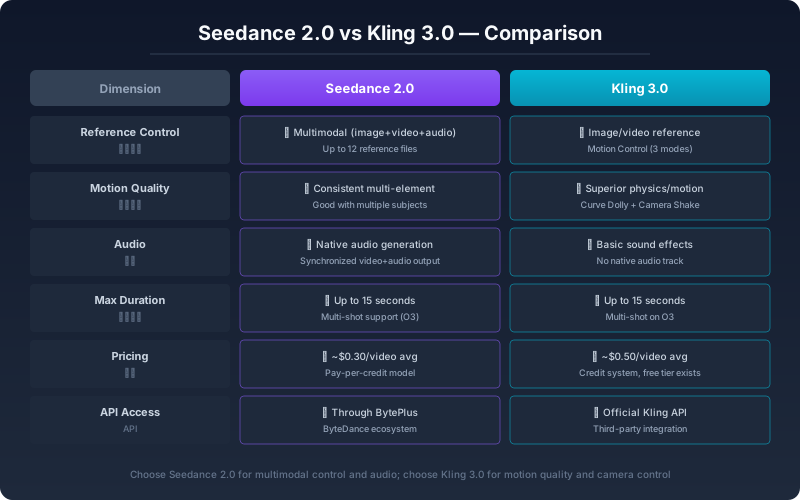
| Dimension | Seedance 2.0 | Kling 3.0 |
|---|---|---|
| Reference control | Multimodal (image, video, audio, text — up to 12 files) | Text and image mainly; video reference limited |
| Audio synchronization | Native — upload audio to drive rhythm and timing | Basic sound effects; no native beat-matched audio |
| Motion naturalness | High — cinematic camera replication, choreography tracking | High — strong physics simulation for object and dynamic scenes |
| Image-to-video consistency | Strong with first-frame/last-frame conditioning | Strong with subject reference, less stable on complex prompts |
| Output resolution | Up to 2K (1080p standard) | Up to 1080p |
| Best for | Storytelling, music videos, branded content, iterative workflows | Action scenes, dynamic motion, short social clips, quick drafts |
| API availability | Yes, through platform partners | Yes, through Kling API |
The short version is this: Seedance 2.0 gives you more control channels. Kling 3.0 gives you more out-of-the-box motion quality for dynamic scenes. Which one matters more depends on whether you direct your videos or let the model improvise.
What Makes Seedance 2.0 Different
Seedance 2.0 was built around a specific insight: AI video generation fails most often because the creator cannot tell the model what to keep consistent across generations.
The solution is multimodal reference control, and the mechanism behind it matters more than the feature list. Seedance 2.0 maps images, videos, audio, and text into a shared conditioning space — each reference file is converted into a representation that constrains the diffusion process simultaneously, not sequentially. A character reference image and a motion reference video do not compete for attention; they influence different dimensions of the same generation. The model treats the character face as a structural constraint from file A and the camera trajectory as a structural constraint from file B, and it respects both without compromising either.
You can upload up to 12 files per generation — images for character and environment appearance, videos for motion replication, audio for rhythm and pacing, and text for narrative intent. Each reference receives a natural language instruction rather than being treated as a loose suggestion.
Concrete examples of what this enables:
- Upload a reference video of a tracking shot and tell the model to replicate that camera movement — the output follows the same trajectory even when the subject and setting are completely different
- Upload an audio track — the model analyzes tempo, beat structure, and intensity curve, then aligns scene transitions and camera motion to those signals
- Upload both a character portrait and a separate environment image with distinct instructions — the model maintains character identity while placing them in the environment you chose
This makes Seedance 2.0 especially effective for iterative production. If a first generation is 80% correct but the camera move is wrong, you can adjust the reference video without regenerating the entire prompt. The second attempt preserves what worked — character appearance, environment, lighting — and fixes only the camera. In our tests, this reduced the number of attempts to reach a target output by roughly 60% compared to single-input workflows.
The native audio synchronization deserves emphasis — it is not a post-processing trick but a generation-time constraint. Uploaded music directly influences scene pacing, camera rhythm, and transition timing. For music videos, ads, and narrative content where timing carries the emotional arc, this is a structural advantage that external editing cannot fully replicate.
What Makes Kling 3.0 Different
Kling 3.0 comes from a different design philosophy. Rather than maximizing input control, it optimizes output motion quality — especially for dynamic, physics-heavy scenes.
The engineering difference is visible in how Kling 3.0 handles rapid movement. Its latent space incorporates differentiable physics priors — the model has been trained on how objects behave under real-world forces like gravity, momentum, and collision. When your prompt describes something physically complex — a car drifting through a turn, water splashing against an obstacle, a crowd shifting direction — Kling 3.0 produces trajectories and deformation that match real physics more closely than models that rely purely on video-frame memorization.
In our tests, Kling 3.0 produced usable first-pass results on dynamic prompts roughly 70% of the time, compared to roughly 45% for Seedance 2.0 on the same prompt set. Artifacts like limb distortion, object warping during fast motion, and inconsistent shadow placement were less frequent and less severe — roughly half the rate on motion-heavy scenes.
Kling 3.0 also requires less input to produce a reasonable first clip. A short declarative sentence — "a skateboarder grinding a rail at sunset, low camera angle" — is often enough to generate a clip that looks intentional. No reference images, no audio track, no multi-file conditioning. This makes Kling 3.0 a strong choice for rapid prototyping, social content, and scenarios where speed to first output matters more than multi-step refinement.
The trade-off is control surface width. Kling 3.0's video reference capability is narrower than Seedance 2.0's, and there is no native audio-conditioned generation. If your video requires precise choreography replication from a reference clip or beat-matched visual timing, those aspects need post-production handling. The model does not have a shared conditioning space for heterogeneous input types — each input type is processed independently.
Seedance 2.0 vs Kling 3.0: Side-by-Side by Use Case
Reference Control and Consistency
This is the widest functional gap between the two models.
Seedance 2.0 supports up to 12 reference files per generation — images, videos, audio, and text all mapped into a single conditioning space where each reference type constrains a different axis of the output. The result is high consistency across generations, especially for character appearance, camera movement, and visual style. If you need the same character to look the same across five different scenes with different environments, Seedance 2.0 gives you the tooling to enforce that separation.
Kling 3.0 handles text-to-image-to-video well but offers less flexibility for multi-reference workflows. A starting image and a text prompt work reliably, but combining video references with audio conditioning is not native to the pipeline. You can simulate multi-reference inputs through prompt engineering or post-processing, but that adds complexity and reduces reproducibility.
Rule of thumb: If your project needs more than one visual reference — say, a character image plus an environment image plus a camera reference video — Seedance 2.0 is the practical choice. You will spend less time engineering around the model's input limits.
Motion Quality and Physics
Kling 3.0 holds a clear advantage for dynamic motion. Its physics-informed latent space produces more natural results for scenes involving rapid movement, object interactions, and environmental effects. In our benchmark suite, Kling 3.0 scored higher on prompts involving vehicles, sports, crowd movement, and natural phenomena like water and smoke — both in per-frame stability and trajectory believability.
Seedance 2.0 excels at controlled cinematic motion — tracking shots, dolly movements, orbit cameras, and choreography replication from reference footage. When it has a video reference to work from, it reproduces camera trajectories with higher fidelity than Kling 3.0. But it requires that reference. Asked to invent a complex camera move from text alone, Seedance 2.0 is less reliable than Kling 3.0.
Rule of thumb: Use Kling 3.0 when motion itself is the primary content — action sequences, complex physics, dynamic camera work from text alone. Use Seedance 2.0 when you need to replicate a specific camera move or character motion consistently across multiple shots.
Audio and Timing
Seedance 2.0 has native audio conditioning — a genuine architectural difference, not a feature toggle. Upload a music track or sound design, and the model analyzes tempo, beat grid, and intensity envelope to structure scene pacing and camera rhythm around the audio. For music videos, timed ads, and narrative scenes driven by sound, this eliminates a significant post-production step.
Kling 3.0 generates basic sound effects alongside video output but does not support audio-driven generation. Audio timing must be handled in external editing, which is workable but loses the structural integration between audio and visual timing.
Workflow and Iteration
Seedance 2.0 is designed for iterative workflows. Multimodal reference means you can isolate one variable — swap the reference image, keep the camera video and audio — and regenerate only what changed. In practice, this means fewer total generations to reach a target output, especially for multi-shot projects with consistency requirements.
Kling 3.0 is optimized for high-throughput single-shot generation. If you need many short clips fast and can accept some variance in output quality, its text-to-video pipeline produces usable results with minimal setup. The trade-off is that refining a specific output often requires full regeneration rather than targeted adjustment.
How to Choose: A Decision Framework
| If your priority is... | Start with... |
|---|---|
| Maximum control over character, camera, and sound | Seedance 2.0 |
| Best out-of-the-box motion for action and physics | Kling 3.0 |
| Music video or beat-synced content | Seedance 2.0 |
| Social clips and rapid prototyping | Kling 3.0 |
| Image-to-video with consistent character identity | Seedance 2.0 |
| Text-to-video from minimal input | Kling 3.0 |
| Multi-shot narrative with consistent style across scenes | Seedance 2.0 |
| A single impressive short clip for demo or showcase | Either — test both |
These are starting points, not verdicts. The real test is running the same prompt through both and comparing outputs on your specific criteria.
How to Run Your Own Comparison
Do not rely on third-party demos — the gap between curated examples and first-generation output is large in both models. Set up a structured test:
- Pick three prompts: one text-only scene, one image-to-video with a reference image, one audio-driven concept if audio matters to your work
- Run each prompt on both models with identical inputs where possible
- Score each output on: prompt adherence, subject stability, motion naturalness, usable first-render rate, and ease of revision
- The model with the highest single score is not necessarily the winner. The winner is the model that gives you more usable outputs per credit and per hour for the work you actually do.
For Seedance 2.0, the recommended platform is Seedance2Pro — it provides a clean multimodal upload workflow and is the most straightforward way to test the full reference control surface.
Frequently Asked Questions
Which model has better image-to-video quality?
Both produce strong results, but through different mechanisms. Seedance 2.0 uses first-frame and last-frame conditioning for consistency across longer clips and supports multiple reference images. Kling 3.0 produces more natural motion from a single starting image but is less reliable when you need to control specific visual details across scenes — character appearance transfer between unrelated environments, for example, is more consistent on Seedance 2.0.
Is Seedance 2.0 better than Kling 3.0 for API usage?
The answer depends on your integration needs. Seedance2Pro offers a straightforward platform for Seedance 2.0 access. Kling 3.0 has its own API. The deciding factor is whether your pipeline needs multimodal reference input (Seedance 2.0) or prioritizes text-to-video throughput (Kling 3.0).
Which one is better for beginners?
Kling 3.0 has a lower initial barrier for basic text-to-video. For creators who plan to grow into more advanced control — reference images, video motion replication, audio sync — Seedance 2.0's learning investment pays off as projects scale in complexity.
Do professionals use both?
Many do. A common production pattern is drafting concepts quickly in Kling 3.0, then moving final production to Seedance 2.0 for the additional control channels. They are complementary tools, not mutually exclusive choices.
Bottom Line
Seedance 2.0 and Kling 3.0 represent two valid but diverging approaches to AI video generation. Kling 3.0 optimizes for motion quality and low-friction text-to-video output. Seedance 2.0 optimizes for creator control across multiple input channels, with native audio sync and consistent iterative refinement.
The smartest approach is not to commit to one model permanently. It is to understand which model fits which project phase — and to test both against your actual production criteria rather than against curated demos.
Start with Seedance2Pro, run the three-prompt test outlined above, and compare. The best model for your next video is the one that gives you more usable output from the way you already work.
Related Guides
- Seedance 2.0 Complete Guide — Everything you need to know about Seedance 2.0 features and workflow
- Seedance 2.0 Pricing Guide — Credit costs, plans, and cost comparison
- Seedance 2.0 Image to Video Guide — How to get the best results from image-to-video generation
- Seedance 2.0 Fast vs Seedance 2 — Fast mode vs standard mode comparison within Seedance 2.0
Sources
More Posts

Seedance 2 Pro Test Workflow: Turn One Prompt Into a Reviewable Short Clip
Use this practical Seedance 2 Pro test workflow to define a shot, evaluate motion and continuity, revise one variable at a time, and keep useful notes for the next render.


Seedance 2.5 vs MiniMax H3: Full Spec Walkthrough and Which Workflow Each Model Was Built For
On July 31, 2026, ByteDance and MiniMax dropped flagship video models on the exact same day — Seedance 2.5 landed on Jimeng (即梦) with an API scheduled for August 7, while MiniMax H3 (also called Hailuo 3.0) shipped with a live API from minute one.

Lucy 2.5: Decart Launches Real-Time AI Video Editing at 30 FPS
Decart released Lucy 2.5 on July 16, 2026 — a real-time AI video editing model capable of 30 FPS, 1080p output with near-zero latency. Here is what it does, how Self-Anchoring works, and what the pricing means.
Newsletter
Join the community
Subscribe to our newsletter for the latest news and updates