Seedance 2.0 Prompt Guide: Best Prompts, Templates & Tips for 2026
Master Seedance 2.0 prompting — from basic text and image prompts to cinematic first/last frame, reference-to-video, and audio-driven prompts. Includes tested templates, mode-specific strategies, and the reusable prompt formula that works across all Seedance 2.0 modes.
You upload a reference image to Seedance 2.0, write what looks like a good text prompt, hit generate — and the result is a mess. The subject morphs, the motion is unnatural, or the camera does something you never asked for.
This is the most common complaint about AI video tools in 2026, and it is almost always a prompting problem, not a model problem.
Seedance 2.0 is different from text-only video models. Because it accepts images, videos, audio, and text — and generates video from all of them together — the prompt's role shifts. Your text prompt no longer needs to describe everything; it needs to describe only what the other inputs cannot provide. The quality of the output depends entirely on how well you understand this shift and write accordingly.
Built from testing hundreds of prompts across every Seedance 2.0 mode, this guide gives you a system for that communication. You will get tested prompt templates, mode-specific strategies, and a reusable formula that works regardless of what kind of video you are making. By the end, you will know exactly what to write — and what to leave out — to get consistent, high-quality results from Seedance 2.0.
[Image blocked: Seedance 2.0 prompt structure diagram: the multimodal prompt framework showing five input channels — text description, image reference, video reference, audio input, and style direction — converging into a unified generation]
Why Prompting Matters More in 2026
AI video models reached a new level of quality this year. Seedance 2.0 can generate 10-second clips with coherent motion, consistent characters, and cinematic lighting — but only if your prompt tells it exactly what to do. The gap between a good prompt and a bad prompt in 2026 is the difference between a usable clip and a wasted generation credit.
The techniques in this guide work because they match how Seedance 2.0 actually processes prompts, not how older models did. Understanding that difference is the first step to consistent results.
How Seedance 2.0 Reads Prompts Differently
Seedance 2.0 processes prompts differently from text-only video models. Because it accepts multiple input types, the text prompt plays a different role:
| Input Type | Role in Generation |
|---|---|
| Text prompt | Directs motion, timing, camera, and narrative intent |
| Image reference | Locks visual identity — subject, style, composition |
| Video reference | Defines motion style, choreography, camera movement |
| Audio input | Drives rhythm, pacing, and mood alignment |
| Style direction | Global aesthetic — cinematic, documentary, animation |
The key insight: In Seedance 2.0, your text prompt should focus on what the other inputs cannot provide — motion, timing, and narrative flow. Do not waste prompt words describing what your reference image already shows.
Once you understand how the model processes different inputs, the next question is which input combination to use for your specific goal.
Deciding Which Mode: A Quick Framework
This is the single most common point of confusion. Users start generating without choosing the right input mode, then wonder why the result does not match their intent.
| Your Goal | Use This Mode | Why |
|---|---|---|
| Create a video from a written idea | Text-to-Video | No reference needed; the text does all the work |
| Animate a specific image | Image-to-Video | The image provides visual base; the prompt adds motion |
| Bridge two key frames | First/Last Frame | The model interpolates motion between your start and end image |
| Match a character or style consistently | Reference-to-Video | Bound references lock identity across generations |
| Sync video rhythm to music or voice | Audio-Driven | Audio drives pacing; the prompt defines what you see |
If you are starting with nothing but an idea, begin with Text-to-Video. If you have a specific character or scene you want to animate, use Image-to-Video with a strong reference image. The wrong starting mode wastes the first several generations on discovery that a different mode would have avoided.
Once you have chosen your mode, the reusable prompt formula below helps you structure the text prompt regardless of which mode you are using.
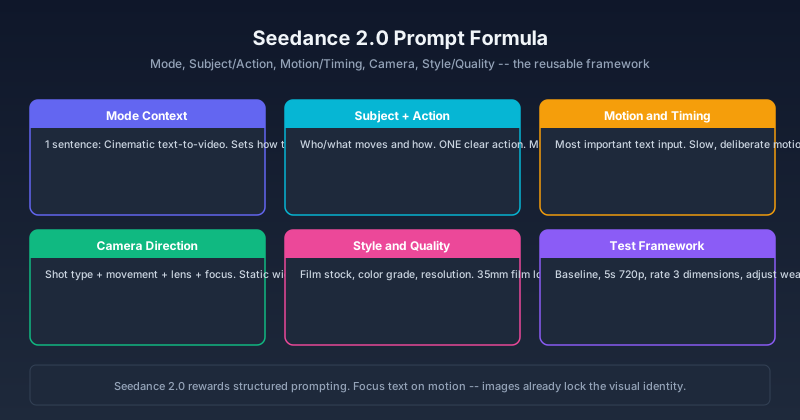
The Seedance 2.0 Prompt Formula
This formula works across all modes. Fill the slots that apply to your generation, leave the rest empty.
[Mode Context] + [Subject + Action] + [Motion & Timing] + [Camera Direction] + [Style & Quality]
Mode Context (1 sentence)
Tell the model what type of generation this is. This sets expectations for how to interpret the rest of the prompt.
- "Cinematic text-to-video generation:"
- "Image-to-video animation from a still portrait:"
- "First-frame to last-frame transition:"
- "Reference-driven character video:"
Subject + Action
What is in the frame and what it does. Keep this to one clear action. Multiple sequential actions confuse the model.
Good: "A ballet dancer executes a single grand jeté across a dark stage"
Bad: "A ballet dancer warms up, then does a pirouette, then a grand jeté, then bows"
Motion & Timing
How things move and at what pace. This is the most important text input for Seedance 2.0.
Motion vocabulary that works:
- "Slow, deliberate motion — each frame holds weight"
- "Fast-paced, dynamic movement — quick cuts in rhythm"
- "Gradual reveal — subject emerges from shadow over 3 seconds"
- "Continuous fluid motion — no pauses, no stutters"
Camera Direction
Where the camera is and how it moves. Seedance 2.0 responds well to cinematic camera language.
Examples:
- "Static wide shot, shallow depth of field"
- "Slow push-in from medium to close-up over 5 seconds"
- "Overhead crane shot, descending to eye level"
- "Handheld vérité style, subtle organic shake"
Style & Quality
The visual aesthetic and technical quality. Reference a cinematic style, film stock, or format.
- "35mm film look, natural grain, warm color grade"
- "Clean digital, sharp, commercial product lighting"
- "Documentary style, available light, realistic colors"
Mode-Specific Prompt Templates
The formula above adapts for each generation mode. Here is how to apply it:
Text-to-Video Template
Tested Example: "Cinematic text-to-video: A lone astronomer peers through a massive telescope in a mountain observatory. Slow, contemplative motion — the telescope tracks across the sky, starlight shifts through the dome opening. Static wide shot inside the observatory, warm amber instrument lights against deep blue night. 10 seconds. Film look, rich shadows, 24fps."
Image-to-Video Template
Tested Example: "Starting from the provided portrait: A subtle shift in expression — eyes crinkle slightly, the hint of a smile forms. Camera holds static, shallow depth of field keeps the face sharp while the background blurs gently. Face and hair stay natural — no morphing, no warping. 5 seconds. Cinematic portrait quality."
First/Last Frame Template
Tested Example: "Transition from the subject standing at the edge of a cliff at sunrise to the subject walking away from the camera along the cliff path. The camera holds position during transition — no pan, no zoom. Motion is slow and deliberate — 5 seconds to move from start to end frame. Subject identity and clothing stay perfectly consistent. 10 seconds. Cinematic, golden hour light throughout."
Reference-to-Video Template
Tested Example: "Using the bound references: The character walks through a rain-soaked Tokyo alley at night, styled as neo-noir cinema. Steady walking pace — the camera tracks alongside at matching speed, shallow depth of field keeps the character sharp against soft neon bokeh. 10 seconds. Anamorphic lens look, deep contrast, film grain."
Audio-Driven Template
Tested Example: "Video synchronized to the provided audio track: Abstract visualizations of sound — particles of light pulse and flow in response to the beat. Motion intensity follows the audio dynamics — calm during verses, explosive during the drop. Camera floats through the particle field, accelerating with the tempo. 10 seconds. Neon color palette, cinematic glow."
The Prompt Testing Framework
Once your template is written, test prompts systematically before rendering at full quality. This low-cost cycle is your most important tool for building Seedance 2.0 skill:
- Write a baseline prompt using the formula or template above
- Generate at 5s 720p — cheapest, fastest
- Rate three dimensions: Motion quality (1–5), Subject accuracy (1–5), Camera execution (1–5)
- Adjust the weakest dimension only — change one thing per iteration
- Regenerate and re-rate — confirm the adjustment improved the score
- Repeat until all three dimensions score 4+
- Render final at target resolution and duration
This framework turns prompt engineering from guessing into a measurable process. The fastest way to improve your results is to identify your weakest dimension and fix only that one in your next generation. Changing multiple things at once makes it impossible to know what worked.
Once you have the formula and the testing cycle down, here are ready-to-use prompts for common scenarios.
Best Prompts by Use Case
Product Showcase
"Cinematic product video: A luxury watch floating in darkness. Slow 360° rotation reveals every detail — the metal band catches rim light, the crystal face reflects a soft key light. Macro lens, extreme close-up, nothing in frame but the watch. 5 seconds. Commercial product photography quality, sharp focus throughout."
Character Introduction
"Cinematic character introduction: A mysterious figure in a long coat stands under a streetlamp in the rain. The figure slowly looks up toward the light — the camera pushes in from wide shot to medium close-up over 5 seconds, revealing facial details gradually. Rain falls in slow motion, each droplet catching the amber light. 10 seconds. Film noir aesthetic."
Landscape/Travel
"Aerial establishing shot: A coastal village wakes up at dawn. The camera flies slowly over terracotta roofs toward the harbor — fishing boats bob gently, morning mist clings to the hills, warm golden light spreads across the scene. Seamless, continuous drone shot. 10 seconds. Nature documentary quality, vibrant but natural colors."
Action Sequence
"Dynamic action: A parkour athlete runs across rooftops at sunset. Fast, athletic motion — the camera tracks from behind, then swings around to a side profile as the athlete vaults a gap between buildings. Quick cuts and speed ramps match the rhythm of the movement. 5 seconds. High-energy sports cinematography."
Expert-Level Prompt Pitfalls (and How to Fix Them)
Even with good templates, certain patterns consistently produce failures. These are not beginner mistakes — they are traps experienced users fall into, and they silently ruin generations. Each pitfall below follows the same structure: the scenario, the root cause, and the resolution.
Pitfall 1: Describing the Image Instead of the Motion
Scenario: You upload a reference image, then write a text prompt describing what is already visible in the image — the subject's appearance, the background, the lighting.
Root Cause: You are treating the text prompt as the complete description of the video, when the image already provides most of the visual information. The text prompt should describe what the image does not contain.
Resolution: Before writing, ask yourself: "What does my reference material not already show?" Write only that.
Pitfall 2: Overloading the Mode Context
Scenario: Your mode context runs three or four sentences, describing what you want the model to do step by step.
Root Cause: You assume the mode context needs to explain the generation process to the model. In reality, the mode context is a flag that tells the model how to interpret your prompt — keeping it to one sentence maintains its signal strength. Multiple sentences dilute the instruction into regular content.
Resolution: "Cinematic text-to-video:" is enough. You do not need to explain what text-to-video means.
Pitfall 3: Abstract Motion Descriptions
Scenario: You use phrases like "dynamic movement," "interesting camera work," or "good pacing" in your prompts and get generic, uninspired results.
Root Cause: Abstract words do not translate into specific motion instructions. The model interprets generic adjectives differently every time, producing inconsistent outputs.
Resolution: Replace every abstract motion word with a concrete description. "Dynamic" → "Fast push-in while subject turns." "Interesting" → "Overhead crane descending to eye level."
Pitfall 4: Ignoring Duration in the Prompt
Scenario: You write a detailed motion sequence but leave the duration at default, or you change the duration setting without adjusting the motion description.
Root Cause: Duration controls how the model paces the motion. A prompt describing a 10-second slow reveal will look rushed at 5 seconds, and a 5-second quick cut will drag at 10 seconds. The model paces the motion to fill the duration you set.
Resolution: Always include a duration cue in the prompt that matches your duration setting. "Over 5 seconds supports the camera push-in quickly" or "A slow 10-second reveal across the scene."
Pitfall 5: Audio Without Visual Direction
Scenario: You upload audio for audio-driven mode but do not describe what should appear on screen.
Root Cause: Audio-driven mode uses the uploaded audio for rhythm and mood, but it still needs a visual direction. Without it, the model produces abstract, often unusable results.
Resolution: Always pair audio with a clear visual description. The audio influences pacing; the prompt defines what the viewer actually sees.
Responsible Prompt Usage: Cost, Credits, and Efficient Testing
Beyond prompt quality, managing generation cost and credits is an essential part of working with Seedance 2.0 professionally. AI video generation is not free — each generation consumes compute time and credits, and costs vary significantly by resolution and duration.
Cost awareness matters before you start. A single 10-second 1080p generation can cost 5–10x more than a 5-second 720p test render. Testing at low resolution first is not just faster — it is substantially cheaper.
How to test without wasting credits
- Always start at 5 seconds, 720p. This is your exploration resolution. Reserve higher resolutions for the final render only.
- Change one variable per generation. Changing mode, subject, camera, and duration at once produces results you cannot learn from.
- Maintain a rating log. For each test generation, record the prompt, the three scores (motion, accuracy, camera), and what you changed. After 10–15 logged tests, patterns become visible.
When to render at full quality
Render at 1080p only after your testing cycle confirms all three dimensions score 4+ at 720p. A bad prompt at 720p will still be a bad prompt at 1080p — resolution does not fix a weak motion description or vague camera direction.
Rule of Thumb
For every 1 minute of final video, budget 15–20 minutes of testing at 720p. This ratio holds across most use cases. If you are spending significantly less time testing, you are generating blind. If you are spending significantly more, review whether you are changing too many variables per test iteration.
Prompt Library: Quick Reference
Save and adapt these prompt starters for your next generation:
Cinematic: "Cinematic shot: [subject] in [environment]. [Camera movement]. [Lighting description]. [Duration]. 24fps, film grain, rich contrast."
Commercial: "Commercial product video: [product] on [background]. Slow [camera movement]. Studio lighting, sharp focus. [Duration]. Clean, polished finish."
Documentary: "Documentary style: [subject] [action] in [real environment]. Handheld camera, available light, natural colors. [Duration]. Vérité feel."
Social Media: "Vertical social video: [subject] [action]. Fast-paced, dynamic motion. Vibrant colors, high energy. 9:16 aspect ratio. [Duration]."
Bottom Line
Seedance 2.0 rewards structured prompting — but structure alone does not guarantee quality. The real gains come from pairing the right structure with a systematic testing habit.
The complete workflow is this: pick the right mode using the decision framework, write your prompt using the five-element formula, adapt it with the mode-specific template, test at low cost while changing one dimension per iteration, and render final only when your three-dimension scores confirm the prompt works.
The single most actionable change you can make right now: the next time a Seedance 2.0 generation fails, do not rewrite the whole prompt. Identify which of the five formula elements was weakest, fix only that one, and regenerate. You will see the difference in one test cycle.
Try your first test generation at seedance2pro.io. Start with a 5-second 720p render using the formula above — see what a structured prompt produces before moving to full quality. For the complete Seedance 2.0 feature reference, see the Seedance 2.0 Complete Guide [blocked].
FAQ
How long should a Seedance 2.0 prompt be?
50–120 words is the sweet spot for most modes. Shorter than 30 words leaves the model guessing about motion and camera. Longer than 150 words often exceeds the model's effective attention span for prompt details.
Do I need to describe my reference image in the text prompt?
No. Seedance 2.0 analyzes reference images directly. Your text prompt should describe motion, camera, and timing — things the image does not contain. Redescribing the image wastes prompt space.
Can I use the same prompt for different modes?
Partially. The subject and style elements can transfer, but motion and camera directions usually need mode-specific adjustment. A text-to-video prompt will underperform in image-to-video mode without adaptation.
What are the best prompts for cinematic quality?
Prompts that include specific camera language (shot type, lens, movement), lighting description, and a style reference (film stock, color grade) consistently produce more cinematic output. The word "cinematic" alone does not do it.
How do I prompt for consistent characters across multiple videos?
Use reference-to-video mode with a bound subject reference image. Keep the character description consistent across prompts, but vary the action, environment, and camera to create different shots of the same character.
How many test generations should I expect before getting a usable result?
3–5 iterations per scene is typical when starting from a baseline prompt. More complex scenes with specific motion or camera requirements may need 8–12 iterations before all three quality dimensions score 4+.
More Posts

Seedance 2.0 vs Sora 2: Which AI Video Model Should You Use in 2026?
Seedance 2.0 vs Sora 2 compared head to head: motion realism, native audio, pricing transparency, commercial rights, and which model fits your workflow in 2026.


How to Use Dreamina Seedance 2.0 to Convert a Video into a Cartoon (Step by Step)
Two working paths to turn a filmed video into a cartoon with Seedance 2.0: the Dreamina route and the Seedance 2 Pro generator route. Step-by-step prompts, credit costs, and fixes for flicker and morphing.

How to Generate Epic Anime Fights in Seedance 2.0 (Step by Step)
Learn how to generate epic anime fights in Seedance 2.0: style setup, fight choreography prompts, settings, character consistency, multi-shot chains, and native audio — with 5 ready-to-use prompts.
Newsletter
Join the community
Subscribe to our newsletter for the latest news and updates